Christmas Mode
December 23, 2025
Every year, the same debate. Light mode or dark mode. As if those are the only options.
Meanwhile, the holiday season comes around and your website sits there, completely undecorated. No snow. No lights. No festive spirit.
That changes today.
Introducing Christmas Mode
Dark mode is boring. Use Christmas mode.
Add festive Christmas decorations to any website with a single line of code. Falling snow, twinkling lights, a decorated Christmas tree, Santa's sleigh with all nine reindeer, marching nutcrackers, elves having snowball fights, and more.
Because your users deserve more than just a color scheme toggle.
Quick Start
Install from npm:
1.npm install christmas-mode
Or include via CDN:
1.<script src="https://unpkg.com/christmas-mode/dist/christmas-mode.umd.js"></script>
Then enable it:
1.import ChristmasMode from "christmas-mode";2.3.ChristmasMode.init({ autoEnable: true });
That's it. Your website now has Christmas spirit.
What You Get
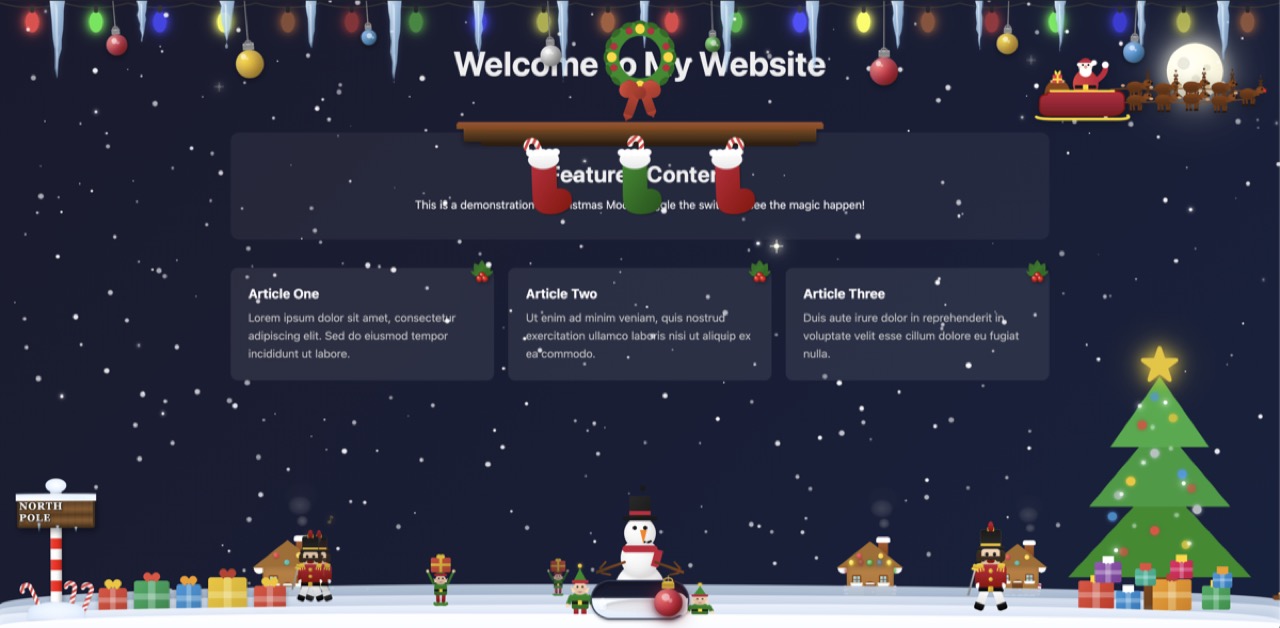
- Falling snow with accumulation effect
- Twinkling Christmas lights along the top
- Icicles hanging from the lights
- Decorated Christmas tree with ornaments and star
- Snowman with hat and scarf
- North Pole sign with candy canes
- Caroler that plays Jingle Bells (click to toggle)
- Santa's sleigh with 9 reindeer (including Rudolph)
- Marching nutcracker soldiers
- Walking elves carrying presents
- Sledding elves
- Elves having a snowball fight
- Stockings hung along the bottom
- Presents under the tree
- Holly decorations
- Festive wreath with bow
- Toggle switch to enable/disable
Configuration
Customize which decorations appear:
1.ChristmasMode.init({2. toggle: true, // Show toggle switch3. musicButton: true, // Show music button/caroler4. autoEnable: false, // Auto-enable on init5. snow: true, // Enable snow effect6. lights: true, // Enable Christmas lights7. tree: true, // Enable Christmas tree8. snowman: true, // Enable snowman9. northPole: true, // Enable North Pole sign10.});
Toggle Position
1.ChristmasMode.init({2. toggle: {3. position: "bottom-right", // 'bottom-right' | 'bottom-left' | 'top-right' | 'top-left'4. },5.});
React Integration
1.import { useEffect } from "react";2.import ChristmasMode from "christmas-mode";3.4.function App() {5. useEffect(() => {6. ChristmasMode.init({ autoEnable: true });7.8. return () => {9. ChristmasMode.destroy();10. };11. }, []);12.13. return <div>My App</div>;14.}
API
1.ChristmasMode.init(options) // Initialize with options2.ChristmasMode.enable() // Show decorations3.ChristmasMode.disable() // Hide decorations4.ChristmasMode.toggle() // Toggle on/off5.ChristmasMode.isEnabled() // Check if active6.ChristmasMode.playMusic() // Start Jingle Bells7.ChristmasMode.stopMusic() // Stop music8.ChristmasMode.toggleMusic() // Toggle music9.ChristmasMode.destroy() // Clean up everything
Contained Mode
Target a specific element instead of the entire page:
1.ChristmasMode.init({2. target: document.getElementById("my-container"),3. autoEnable: true,4.});
Try It
Zero dependencies. Works with React, Vue, Angular, vanilla HTML. TypeScript definitions included.
1.npm install christmas-mode
Check out the GitHub repository for full documentation.
Watch the product story to see it in action.
You Might Also Like

I Can't Believe It's Not CSS: Styling Websites with SQL
Style websites using SQL instead of CSS. Database migrations for your styles. Because CSS is the wrong kind of declarative.

Introducing The Anti-AI UI Framework
A UI component library designed to frustrate AI browsers. 20 battle-tested patterns. Because humans have suffered long enough alone.

Luigi CSS
Luigi from Super Mario recreated in CSS